FAQ - Frequently Asked Questions
Ad: Picture validation - How to remove picture validation?
How to: Remove picture validation.
If you are currently validated:
1. Go to your ad dashboard and click on the link "images."

2. Then click here.
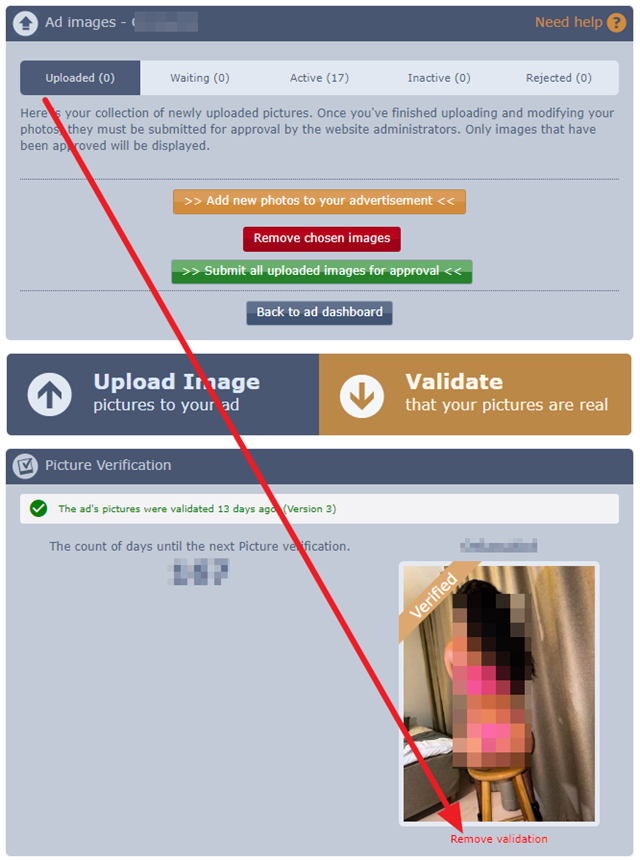
If you are currently NOT validated:
(But have started the validation process and wish to remove everything)
1. Go to your ad dashboard and click on the link "images."
2. Then click here.
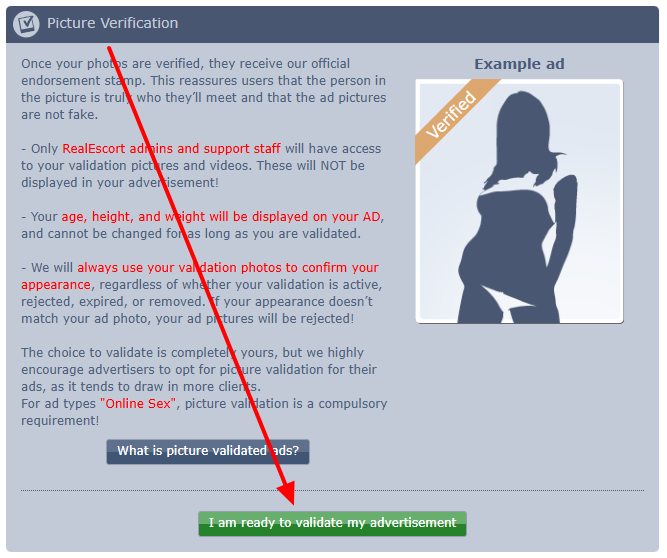
3. Then click here at the bottom.

Note:
- We will always use your validation photos to confirm your appearance, regardless of whether your validation is active, rejected, expired, or removed. If your appearance doesn’t match your ad photo, your ad pictures will be rejected!
If you are currently validated:
1. Go to your ad dashboard and click on the link "images."
2. Then click here.
If you are currently NOT validated:
(But have started the validation process and wish to remove everything)
1. Go to your ad dashboard and click on the link "images."
2. Then click here.
3. Then click here at the bottom.
Note:
- We will always use your validation photos to confirm your appearance, regardless of whether your validation is active, rejected, expired, or removed. If your appearance doesn’t match your ad photo, your ad pictures will be rejected!